


Unity by Hard Rock
4.61.07K Reviews
App Specs
- Version
- 2.5.42
- Updated On
- License
- Free
- Downloads
- 100,000+
- Developer
- Seminole Hard Rock Support Services, LLC
- Categories
- Travel & Local
- Platform
- Android
Screenshots

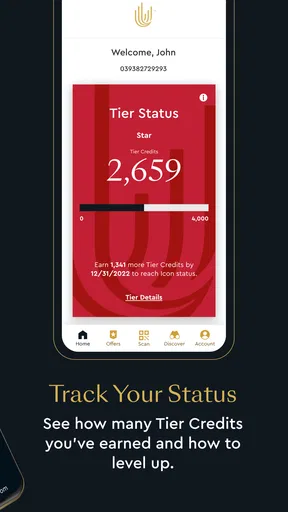
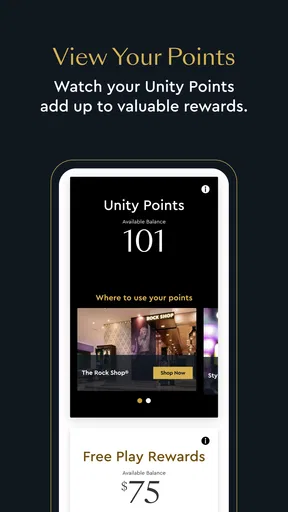
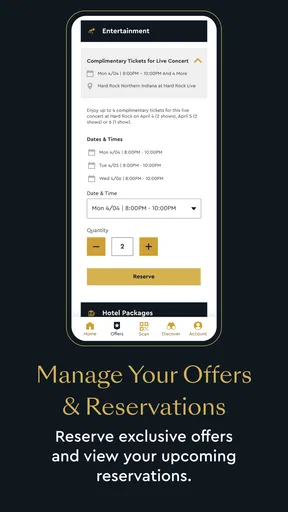
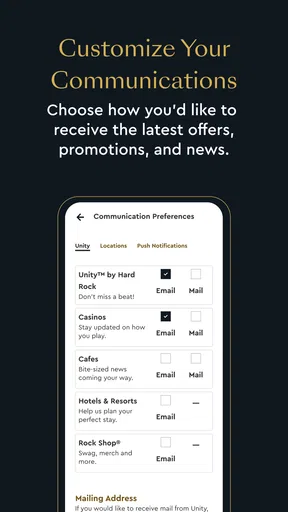
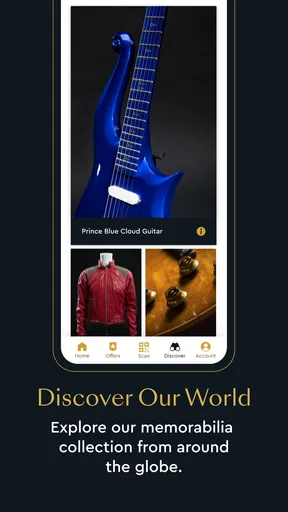
 Analysis by AppCompare
I approached Unity by Hard Rock as a travel and local companion rather than as a general-purpose trip planner. That distinction matters. The app is built around the Unity experience connected with Hard Rock, so its value depends heavily on whether you visit participating Hard Rock destinations and want a convenient way to keep those experiences together. If that describes you, it can be much more useful than a standard map or a collection of separate venue apps.
The application is free to download, carries a Mature 17+ rating, and is developed by Seminole Hard Rock Support Services, LLC. It has reached over 100 thousand installs and holds a 4.6 average from around 13 thousand ratings, which suggests that many users find it worthwhile for their particular travel and rewards routines. I would not treat those numbers as a guarantee, though. This is a focused app, not something every traveler will need on every trip.
My overall impression is that Unity works best when I use it before, during, and after a Hard Rock visit instead of opening it only when I am already standing at a venue. The biggest gains come from preparing the account, checking the available options calmly, and making the app part of a repeatable travel habit. Used that way, it feels less like a promotional extra and more like a practical access point for rewards-related experiences.
How I use Unity by Hard Rock as a travel companion
I use Unity by Hard Rock as a focused companion for visits where my plans include a Hard Rock destination, not as a substitute for a map or a complete itinerary. In this section, I’ll explain how a little preparation can make it easier to check the account and think through relevant options before the day gets busy. That approach also helps me notice when a separate travel tool is the better choice.
The most useful starting workflow
My baseline workflow begins before leaving home. I install the app, sign in or create the relevant Unity profile, and spend a few minutes becoming familiar with the main areas rather than waiting until I need something urgently. That small preparation step is easy to skip, but it prevents the common problem of trying to understand an account or reward screen while moving through a busy property.
I then check the information that matters to my visit and make a simple mental note of where I expect to return. I do not rely on the app as my only source of travel planning. Maps, reservations, transport details, and personal schedules still belong in the tools designed for those jobs. Unity is more valuable as the Hard Rock-specific layer of the trip.
That separation is one of the first practical lessons I took from using it. A normal travel app is better at comparing routes, organizing a full itinerary, or finding unrelated restaurants and attractions. Unity is better when the question is, “What can I do with my Hard Rock relationship while I am here?” Trying to make it replace a map app creates unnecessary friction.
Worth Reading Before You Choose

Flipboard Shows What News Apps Must Do Beyond the Feed

Switching to Android Auto Means Rethinking Your Driving Routine

Google Calendar Makes a Crowded Week Easier to Manage

Ludo King Makes the Most of the Minutes Between Plans

Baby Panda World Brings Quick Play to Modern Phones, but Its Game Library Feels Busy

ESPN’s Live Game View Makes Following Close Games Easier
For a realistic everyday scenario, imagine a weekend visit where I plan to spend time at a Hard Rock property, check my Unity status, and decide whether to use an available benefit during the stay. I would review the account before arriving, keep the app ready on my phone, and check the relevant screen before making a purchase or changing plans. That sequence is faster and less stressful than opening the app for the first time at the counter.
Why preparation matters more than constant checking
I do not find much value in repeatedly opening the app without a purpose. The better habit is to check it at three sensible moments: before the trip, when I arrive, and before using an offer or benefit. This keeps the app useful without turning it into something I monitor constantly.
There is also a practical reason to avoid last-second decisions. A reward or account detail may affect what I choose to do, but it should not be the only factor. I still consider opening hours, personal spending limits, travel time, and whether the benefit actually fits my plans. A reward is useful only when it improves the trip rather than dictating it.
Experienced users will also keep their phone ready in a low-pressure way. I prefer checking the account while connected to reliable internet and making sure I can access the correct profile before I need it. I would not assume that every part of a venue visit will be equally convenient for loading screens, so preparing in advance is a sensible safeguard even when the app itself is straightforward.
Settings and account details worth checking
The first settings I would review are the account and notification controls. I want the profile information to be accurate, the correct account to be active, and notifications to match how often I actually want to hear from the service. If alerts are too frequent, they can make useful information harder to notice; if they are disabled completely, I may miss something relevant to a planned visit.
I also pay attention to privacy and phone-level permissions rather than accepting every prompt automatically. A travel-related app can be useful without becoming the center of my phone. I decide whether notifications, location access, or other requests make sense for my own routine, and I change them later if the experience becomes distracting. The right choice depends on how I use the app, not on a universal setting that suits everyone.
Another worthwhile check is the app version. The current version is 2.5.41, and the minimum operating-system requirement is Android or iOS version 9. That makes the compatibility range relatively approachable for people using older supported phones, although I would still keep the operating system and app updated when possible. Updates are especially important for an account-based travel tool because a small technical problem at the wrong moment can be more annoying than a missing feature.
I would also review the phone’s battery and data behavior before a full day out. I do not leave unnecessary screens open, and I avoid treating the app as a replacement for offline travel notes. Saving essential reservation details or directions elsewhere is sensible because Unity’s focus is the Hard Rock experience, not complete trip resilience.
Repeatable habits that make the app faster
The fastest pattern I found is simple: decide what I need before opening Unity. If I am checking my account, I go directly for that purpose. If I am looking for a benefit, I avoid wandering through unrelated areas first. This sounds obvious, but a clear question makes almost any app feel quicker.
I also use a short pre-visit checklist. I confirm that I am signed into the intended account, review the relevant Unity information, check my notification choices, and make sure my phone is ready for the day. I do not need to repeat every step every time, but doing it before an important visit turns the app into a reliable routine instead of a last-minute experiment.
A second useful habit is to separate “planning” from “redeeming.” During planning, I can compare the available possibilities with my schedule and budget. During the visit, I only need to retrieve the information that supports the decision I have already made. This reduces impulsive choices and keeps the app from encouraging me to spend simply because something appears available.
For frequent visitors, I would keep a personal note of the questions I regularly ask: what is available, when I expect to use it, and whether it fits this particular trip. That note does not duplicate the app; it gives me context the app cannot know, such as whether I am traveling with family, meeting friends, or keeping the visit short. The combination is more useful than either tool alone.
Where Unity is stronger than ordinary alternatives
Compared with a general travel app, Unity has a narrower but more relevant purpose. A map can show me how to reach a property, but it cannot organize the Hard Rock-specific account experience in the same way. A browser can display scattered information, but switching between pages is less convenient when I want one place to check my relationship with the brand.
That focus is the app’s real strength. I do not have to treat every visit as a completely new research task. Once I understand the account area and the general flow, repeat visits become easier. The app is particularly suitable for people who return to Hard Rock destinations, actively pay attention to Unity benefits, or prefer managing travel-related details from a phone rather than relying on printed material.
It is less compelling for someone making a one-time visit with no interest in the Unity program. In that case, a map, venue website, or direct booking channel may be enough. Installing a specialized app adds another account and another place to check, so the benefit needs to justify that small amount of maintenance.
The limits I would keep in mind
The first limitation is scope. Unity is not a complete travel planner, and I would not expect it to handle every part of a vacation. It does not replace maps, airline tools, hotel management, budgeting apps, or a personal itinerary. The more unrelated tasks I try to force into it, the less clear its purpose becomes.
The second limitation is that its usefulness depends on my connection to Hard Rock and the Unity experience. Someone who rarely visits relevant destinations may open it only occasionally, which makes remembering login details and notification choices more effort than it is worth. In that situation, a normal browser search may be the simpler option.
I also keep expectations realistic about convenience. An app can put account information in one place, but it cannot remove every step involved in using a benefit. I still need to read the conditions shown in the app, make sure the option applies to my situation, and ask staff when a venue-specific question is unclear. Treating the screen as automatic approval would be a mistake.
There is a personal-finance trade-off as well. Rewards can make a planned visit feel more valuable, but they can also tempt me to spend more time or money than intended. I use Unity as an information tool, set my own limits before arriving, and judge each option on its actual value. That approach keeps the app helpful without allowing the reward system to control the trip.
Who should use it and who should skip it
I would recommend Unity to regular Hard Rock visitors, travelers who want their Unity-related information close at hand, and people who prefer preparing their venue experience before they arrive. It is also a good fit for users who enjoy repeatable routines: check the account, review the relevant option, make a plan, and use the app only when needed.
I would be more cautious about recommending it to a casual tourist visiting once, a traveler who already has no interest in rewards, or anyone looking for a broad local-discovery tool. The Travel & Local category can make the app sound like a general destination guide, but its practical identity is much more specific. That specialization is useful for the right person and unnecessary for everyone else.
The Mature 17+ rating is another reason I would not present it as a universal family travel app. Adults deciding whether it fits their own visit should consider the nature of the Hard Rock environment and their personal comfort with the service. I would not install it on a child’s device or describe it as a kid-focused travel utility.
My verdict after building a routine around it
Unity by Hard Rock earns its place on my phone when I have a real connection to Hard Rock destinations and intend to use the Unity experience more than once. Its free price removes the biggest barrier to trying it, while the focused design gives it a clear role that general travel apps do not cover. The 4.6 average and more than 1.1 thousand written reviews reflect a strong reception, but my recommendation still depends on whether the app matches the way someone travels.
I like it most as a preparation and account-access tool, not as a complete vacation planner. The best results come from checking settings early, keeping notifications under control, separating reward decisions from impulse spending, and using maps or other travel services for everything outside the Hard Rock relationship. Those habits make the experience more efficient and also expose its limits honestly.
My final advice is straightforward: install it before a planned visit, explore it while you have time, and decide whether its information genuinely supports your trip. If you return to Hard Rock properties or actively use Unity benefits, it can become a convenient part of your travel routine. If you only need directions or general local recommendations, I would skip the extra app and use the simpler tools already suited to those tasks.
Pros
- Earn rewards and loyalty points through eligible Hard Rock purchases.
- Find nearby Hard Rock venues and explore available entertainment options.
- Access exclusive offers
- promotions
- and member-only benefits.
- Digital membership makes it easier to manage your Rock Star Rewards account.
- Useful companion for guests who regularly visit Hard Rock casinos or hotels.
Cons
- Many features are only useful at participating Hard Rock locations.
- Rewards and offers may vary by country
- venue
- and membership status.
- Some app functions may require location access and other permissions.
- The experience can feel limited if you rarely visit Hard Rock properties.
- Account setup and identity verification may take extra time for new members.
FAQs for Unity by Hard Rock
What is Unity by Hard Rock?
Unity by Hard Rock is Hard Rock’s loyalty and rewards program, designed to give members benefits across participating Hard Rock locations. Depending on the property and region, the app may help you view your Unity status, track rewards, discover member offers, and access information about hotels, casinos, restaurants, entertainment, and other Hard Rock experiences. Available features can vary by country and property.
How do I create an account and join Unity by Hard Rock?
You can generally join by downloading the app and registering with your personal information, or by signing in with an existing Unity account. During setup, the app may request details such as your name, email address, date of birth, and contact information. Some benefits are subject to eligibility rules, identity verification, local regulations, and the terms of the specific Hard Rock property you visit.
What rewards and benefits can I receive through the app?
Unity benefits may include points, member-only offers, discounts, promotional invitations, tier recognition, and rewards connected with eligible gaming, hotel, dining, entertainment, or retail activity. The exact value and availability depend on your location, membership level, current promotions, and applicable terms. Before relying on an offer, check its expiration date, restrictions, redemption requirements, and participating property.
Can I use Unity by Hard Rock at every Hard Rock location?
Not necessarily. Unity participation, benefits, and app functionality can differ between countries, states, casinos, hotels, and other Hard Rock venues. Some rewards may only be valid at selected properties or within a particular market, while certain features may be unavailable because of local laws or operational limitations. It is best to confirm the conditions shown in the app before traveling or attempting redemption.
Is Unity by Hard Rock free to download and use?
The app is generally free to download, and creating a Unity membership typically does not require a separate subscription fee. However, using services promoted through the app—such as hotel stays, dining, entertainment, or casino activities—may involve charges, eligibility requirements, or age restrictions. Standard mobile data charges may also apply, and users should review privacy, promotional, and responsible gaming information before participating.


